
If you run an auto repair shop, here’s an uncomfortable bet: you’re paying for parts billing that’s flat wrong, and nobody’s caught it. (An alternator billed twice. Bold strategy, Cotton.) Not fraud — just a wrong price here, an uncredited core there, a return that never posted. Across a year it adds up to somewhere between $5,000 and $15,000 you’re eating without ever seeing it. Invoice reconciliation software is the tool that catches it. It checks every vendor invoice line against the repair order it belongs to and the price you expected, so you confirm what you owe before you pay it.
This is for the owner or multi-location operator deciding whether you need invoice reconciliation software at all, and what separates a real one from a glorified bill-pay tool. I’ll define the category, draw the hard line between reconciliation and AP automation, show what a parts invoice actually has to match in a shop, and give you the buyer criteria that matter. I’ll also be straight about what it does not do.
Read it in five minutes. Decide in one.
What invoice reconciliation software actually does
Invoice reconciliation software verifies that vendor invoices are correct before you pay them.
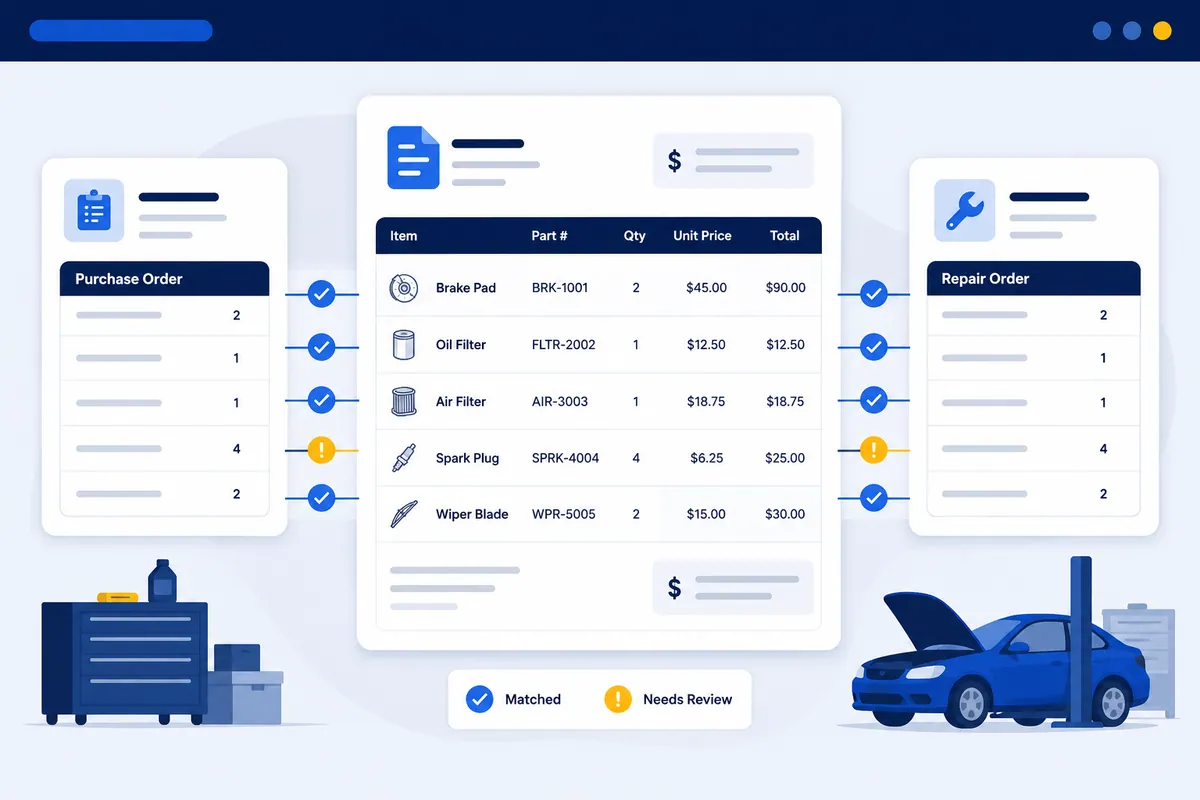
It matches each line against what actually happened in the shop: the repair order the part belongs to, the price your matrix expected, and the credit memo if the part came back. It sits between your vendor invoices, your shop management system (Tekmetric, Shop-Ware, Mitchell 1, NAPA TRACS, Protractor, Fullbay, RO Writer), and QuickBooks. Then it reads what no single one of those can tell you alone.
The reason it exists is simple. Nobody is checking.
A counter person orders forty parts a day across three suppliers. The invoices arrive as PDFs and statements. They get keyed into QuickBooks. They get paid. At no point does anyone open a $1,900 parts invoice and confirm that all twenty-two lines match the quoted price, that the two returns posted as credits, and that the cores came back.
There isn’t time to do that by hand. So it doesn’t get done.
Here’s the interesting part. The software does it on every line, automatically. And for a multi-location group, it does it the same way at every shop instead of depending on whichever bookkeeper is sharpest that week.
Your vendor invoice shouldn’t be taken on faith
This is the opinion I’ll stake the whole post on: paying a vendor invoice before anyone has checked it is backwards.
Most shops don’t do it out of laziness. They do it because the math feels impossible. Forty lines a day, times three vendors, times thirty days, is more than 3,000 lines a month. Nobody is eyeballing 3,000 lines.
So the invoice gets trusted by default. Trust, but verify is a nice saying right up until the verify part requires a forensic accountant and a free weekend.
I get why people do it. I’ve made that mistake too. When I was filing invoices in my dad’s shop, the goal was getting the stack off the desk, not auditing it. (I also called the pricing matrix “the magic number sheet” for years. A service writer informed me that’s not the technical term. I informed him it was, as of that morning.)
The math is the whole argument. A shop moving $50,000 in parts a month, leaking a conservative 2%, is bleeding $1,000 a month — $12,000 a year (illustrative). Run five locations and that’s $60,000 a year nobody on your team has the hours to chase by hand. The leak is too small to feel and too big to ignore.
Invoice reconciliation vs AP automation: the step generic tools skip
This is the distinction that decides whether a tool protects your margin, so let me be precise.
AP automation is about speed. It captures an invoice, codes it to a GL account, routes it for approval, and pays it. Done well, it turns hours of data entry into minutes. That’s genuinely useful.
Invoice reconciliation is about accuracy. It asks the one question AP automation never does: is the number on this invoice the number I actually owe?
Here’s the trap. A generic AP platform — BILL, Melio, Stampli, Ramp — can take a parts invoice that overbills you by $40, read it cleanly, route it for one-click approval, and pay it on time, with a flawless audit trail. Every step worked. You still lost the $40, because none of those steps checked the price against your order.
Fast and wrong is still wrong. It’s just wrong on schedule now.
Both jobs are real. A multi-shop operator legitimately wants AP automation to standardize how five back offices process invoices. But automation without reconciliation just means you pay the wrong amounts faster and more consistently. If you want the full capture-to-pay picture, I walk it step by step in what AP automation software actually is. The takeaway here: reconciliation is the line-level matching those tools were never built to do.
What a parts invoice actually has to match
Generic AP software leans on the classic three-way match — purchase order, goods receipt, vendor invoice. That’s a warehouse control, and it doesn’t map cleanly to a repair shop. You don’t cut a formal PO and log a goods-receipt for every brake pad. You order a part for a job, it shows up, the vendor bills you. To a shop, the order, the delivery, and the invoice are basically one event — which is why “did all three documents agree?” is the wrong question here.
Shop reconciliation checks the three things that actually move money:
- The repair order. Every part should tie to an RO — best practice is to put the RO number on the order as your PO number. That match proves the part was sold to a customer, used internally, or stocked. A part with no RO is a part you paid for and can’t account for.
- The price. The billed cost should match your quote and your matrix. A wheel bearing billed at $94 when your cost was $78 is a $16 leak your SMS never flags.
- The credit. If the part was returned or it carries a core, a credit memo has to actually post. A return slip proves you meant to send it back. A credit proves the money came back. Two different facts, and only one of them shows up in your account.
Tie all three to the month-end vendor statement and the invoice is reconciled — not because three documents matched, but because you can say where every part and every dollar went.
Work a single invoice (illustrative). Say a $1,900 NAPA invoice has twenty-two lines:
- One line bills a wheel bearing at $94 when your quoted cost was $78 — a $16 overcharge.
- Two core charges at $45 each were returned last week but show no credit — $90 uncredited.
- One $62 part was ordered, received, and billed, but never made it onto an RO — $62 you can’t account for.
That’s $168 of problems on one $1,900 invoice, roughly 9%. You will not catch that by squinting at a PDF on a Friday afternoon. Software matching all twenty-two lines against your orders and ROs flags exactly those three and waves the rest through.
Where parts margin actually leaks
Across thousands of shop invoices, parts margin tends to disappear in a handful of recurring places. Automated invoice matching is built to surface them.
Off-matrix pricing. The parts matrix says one price; the part got sold at another — often an advisor pricing off-matrix to close a sale. Line-matching against your matrix surfaces every instance. The full breakdown lives in service advisor discounting and parts gross profit.
Cores and returned parts. Cores and returns that never physically go back, or go back but never get credited by the vendor. Cores aren’t homing pigeons; they don’t come back on their own. This is the most common money sitting on the table — the full playbook is in uncredited core charges.
Parts bought but never sold or credited. A part you paid for that never shows up as a sale or a credit. The fourth-leg RO match is what catches it. Why parts move differently than ordinary AP is covered in parts reconciliation explained.
Plain vendor overbilling. A price padded above your quote, a duplicate invoice, sales tax wrongly charged on resale parts, shipping eaten instead of billed through to the RO. More on the duplicate-and-overcharge pattern in vendor overbilling in auto repair.
None of these are dramatic on their own. Each is a small, repeated leak that compounds until you audit a month and add it up.
The credit a vendor never gave back
A few words on why this matters even when you trust everyone, because I’ve watched it play out.
One transmission franchise started using WickedFile to reconcile vendor statements. Almost immediately they found something nobody expected. The employee fulfilling their orders at the vendor had been quietly withholding credits to make his own department’s numbers look better. Thousands of dollars that should have come back to the shop never did.
The owner was furious. The ironic part? He had “Stop the Steal” signs hanging around his own shop, because he was laser-focused on employee theft. He never imagined the money was leaking out the other end, at a vendor he’d done business with for years.
The lesson wasn’t that vendors are crooks. They’re mostly not. The lesson was that every dollar deserves an explanation, no matter which direction it’s flowing.
A return slip proves you intended to send a part back. It does not prove the vendor credited you. Those are two different facts, and only one of them puts money back in your account.
What to look for in invoice reconciliation software for a shop
Not every “reconciliation” tool reconciles at the level a shop needs. Use these on a demo:
- Line-level parts matching, not header totals. A tool that only confirms the invoice total matches the PO total is useless if the lines underneath are wrong. Make it match part, quantity, and price per line.
- RO-level reconciliation. It has to tie parts back to repair orders — the fourth leg. If it stops at PO-to-invoice, it can’t catch parts bought but never sold.
- Direct integration with your SMS and QuickBooks. It should pull from Tekmetric, Shop-Ware, Mitchell 1, NAPA TRACS, Protractor, Fullbay, or RO Writer, and reconcile against QuickBooks — not make you export spreadsheets.
- Core and credit tracking. It should flag every core and return not yet credited, and follow them to the month-end statement. That’s the level vendor statement reconciliation covers.
- Multi-location rollups. If you run more than one shop, you want one dashboard showing leakage by location — not five logins and five different processes.
- Honesty about scope. The right tool tells you what it doesn’t do. A “reconciliation” tool that also promises to pay your bills and issue cards is a bill-pay platform in a costume.
Why generic tools miss shop-specific leaks
Plenty of horizontal AP and reconciliation tools exist. They were built for a business that buys office supplies and software subscriptions — a clean world of PO, receipt, invoice. They do that genuinely well.
A shop is not that world.
There’s no fourth leg in their model. No repair order. No core charge. No parts matrix. No return-to-vendor credit cycle. So a generic tool can three-way match a parts invoice against a PO and call it clean — while missing the uncredited core, the off-matrix price, and the part that never hit an RO.
It isn’t a bad tool. It’s just blind to the leaks that are specific to how a shop makes and loses money. That’s why a shop running a generic platform can have a spotless audit trail and still lose 2% of parts margin every month. The workflow was perfect. The matching was shallow.
Where WickedFile fits (and what it does not do)
WickedFile is invoice reconciliation software built specifically for auto repair shops and multi-location groups. It reads your vendor invoices, matches them line by line against your orders and repair orders across your SMS and QuickBooks, and surfaces the leaks — off-matrix pricing, uncredited cores and returns, vendor overbilling, and parts bought but never sold. It does the fourth-leg RO match a generic tool can’t, and rolls leakage up by location so an MSO sees it in one place.
Now the part most marketing skips. Here’s what it does not do, stated plainly.
WickedFile does not process payments. It does not issue corporate cards. It does not handle accounts receivable or customer invoicing. It is not a bill-pay platform. It does not replace your SMS or QuickBooks. It is the verification layer between your systems — the step that tells you whether the bill is right. You still pay it however you pay it today.
That separation is deliberate. The tool that checks the invoice shouldn’t be the same tool racing to pay it. Patching your AP workflow without checking your invoices is patching the roof while the basement floods. Both have to work, or neither one does.
You can audit one month for free. The trial scans 500 pages, no credit card, no Dire Straits CD required (though I’d recommend one). Book a demo and I’ll show you the first leak on your own invoices — or compare WickedFile against the generic AP tools and see exactly where the line is. Either way, you’ll finally know where the money went, which beats wondering. Find the leak before your parts spend needs its own area code.