
I asked a shop owner what his AP process was. He said, “Brenda.” Brenda is wonderful. Brenda is also one Tuesday flu away from your accounts payable grinding to a halt — which is the polite way of saying her job is begging to be software. AP automation software is technology that digitizes the accounts payable workflow — capturing vendor invoices, coding them, approving them, and paying them — so your team stops keying it all in by hand. It swaps manual data entry and email-chain approvals for a tracked digital flow that moves each invoice faster, with fewer fat-fingered amounts.
This one is for the owner or multi-location operator trying to figure out what “AP automation software” actually means before you spend money on it. I’ll walk the four steps it runs, draw a hard line between what it is and what it is not, run the labor math, and then be honest about the one thing it skips — the thing that costs auto repair shops the most. Read it once and you’ll know exactly what to ask on a demo.
What is AP automation software?
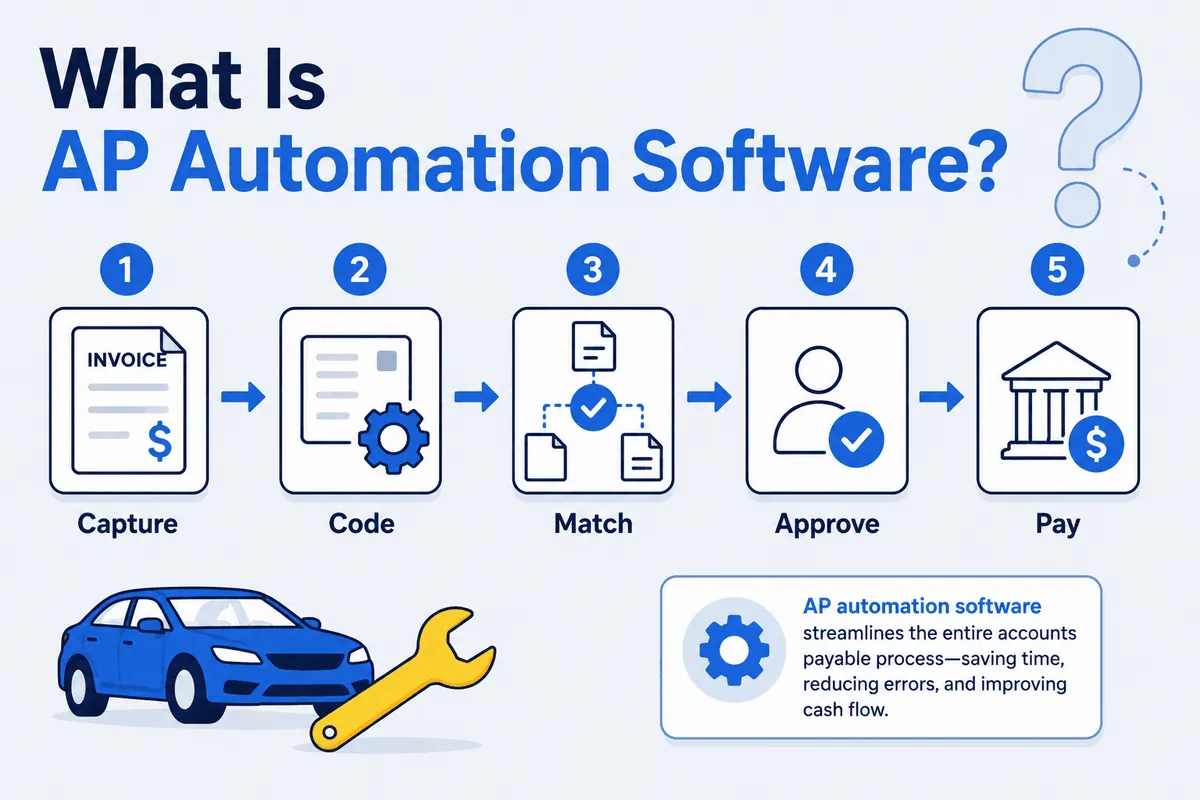
AP automation software takes the accounts payable workflow — every step between a vendor invoice landing in your inbox and money leaving your account — and runs it digitally instead of manually. “AP” is accounts payable: the money you owe vendors. Automating it means the software reads the invoice, files it to the right account, routes it for sign-off, and pays it, with a human supervising rather than typing.
The reason it exists is simple. Manual AP is slow, error-prone, and invisible. A part-time bookkeeper keying 200 invoices a month is 200 chances to mistype an amount, miss a due date, or pay a duplicate. AP automation turns that pile of paper and PDFs into a tracked, auditable flow. For a single shop it saves hours. For a multi-location group with five back offices doing the same manual work five different ways, it standardizes the whole thing — which, if you’ve ever compared how two of your locations file invoices, you know is worth a lot on its own.
How AP automation software works: capture, code, approve, pay
Nearly every AP automation tool — BILL, Melio, Stampli, Ramp, Tipalti — runs the same core workflow. Knowing the steps is how you cut through the demo theater.
- Capture. The invoice arrives by email, scan, or upload, and the software reads it with OCR — pulling vendor, date, amount, and line items instead of someone typing them in.
- Code. The software assigns the invoice to the correct general-ledger account or cost center, so it lands in the right bucket in your books. Good tools learn from past coding and pre-fill it.
- Approve. The invoice routes to the right person on a rules-based workflow — over $500 goes to the manager, this vendor goes to the GM — instead of aging quietly in someone’s inbox.
- Pay. Once approved, payment gets scheduled and released by ACH, check, or card, and the record syncs back to QuickBooks.
That’s the entire pitch: take those steps off your team’s plate and make them fast, consistent, and trackable. Some tools add a matching step — comparing the invoice to a purchase order before approval — which gets you closer to verification but, as we’ll see, still isn’t the same thing for a parts-heavy shop. For a multi-shop operator, the real payoff is that all of it happens the same way at every location.
What AP automation software is — and is NOT
Here’s where buyers get turned around, so let me be precise.
It is the front end to your accounting — the capture-to-approval workflow that feeds clean data into your ledger.
It is NOT your ledger. AP automation does not replace QuickBooks, Sage, or Xero. It feeds them. Your books of record stay where they are; the AP tool just stops your team from keying into them by hand.
It is NOT accounts receivable. AP is money you owe out. AR — invoicing customers and collecting — is a different system entirely. If a tool does both, that’s two products in one login, not one magic box.
It is NOT verification that you were charged correctly. This is the big one, and we’ll come back to it. AP automation confirms an invoice was captured, coded, and approved, and that you paid it. It does not independently confirm the vendor’s price was right, that a promised credit actually posted, or that what you paid for matches what you sold. It trusts the invoice. That trust is exactly where money leaks.
The labor math: is AP automation worth it?
The benefit is real and measurable: time.
As an illustration, take a shop processing 200 parts and shop-supply invoices a month at roughly six minutes each of manual capture, coding, and entry. That’s 20 hours a month — call it $450 in labor at $22.50 an hour, or about $5,400 a year, on data entry alone. Add the duplicate payments and late fees that manual AP tends to produce, and a single shop is easily looking at $7,000 to $9,000 a year in avoidable cost. (Illustrative numbers — plug in your own and the shape holds.) Run that across an 11-location group and the standardization payoff climbs into six figures fast.
So automate it. The labor case is clear. For a fuller breakdown of which tools earn the spend, see our guides to the best AP automation software and a head-to-head AP automation software comparison.
But here’s the thing about a perfectly automated AP workflow: it will pay a wrong invoice with the same speed and confidence it pays a right one. It does not flinch. AP automation makes paying fast. It does not make paying correct.
The step AP automation skips: reconciliation
This is the part of the demo nobody runs for you.
AP automation will capture a NAPA invoice, code it to parts, route it, and cut the check — flawlessly — even when that invoice billed you for a core you already returned, charged sales tax on a part bought for resale, or priced a part above what you actually sold it for on the repair order. The workflow ran perfectly. You still lost money.
That’s because moving an invoice and verifying an invoice are two different jobs. Moving it is AP automation. Verifying it — confirming the bill is actually correct before you pay — is reconciliation, and it’s a separate discipline with separate software. I wrote a whole primer on where the line sits in invoice reconciliation software vs AP automation, because the two get marketed as the same thing and they are not.
Here’s the opinion I’ll plant a flag on: paying an invoice before you’ve reconciled it is backwards. Most shops do it anyway, because the AP tool makes paying so easy that “approve” starts to feel like “verify.” It isn’t. Approve means a human said yes. Verify means the numbers were checked against reality. A fast AP workflow without reconciliation just lets you pay the wrong amount sooner.
The auto repair exception: parts invoices and repair orders
For most businesses, the skipped step barely matters. A software company paying its AWS bill isn’t reconciling line items against jobs. Auto repair is the exception, because your largest payable — parts — is also where your margin lives or dies.
Every parts invoice should tie back to a repair order. The part you bought should land on an RO, priced off your matrix, with cores and returns credited. AP automation never makes that connection. It treats a $6,000 monthly vendor statement as one payable to approve, not 300 parts to verify against 300 RO lines.
Worked example (illustrative): a shop doing $60,000 a month in parts purchases. If just 1.5% of that leaks through uncredited cores, off-matrix pricing, and parts bought but never sold, that’s $900 a month — about $10,800 a year — that AP automation will pay out cleanly and never flag. Across an MSO, multiply by location. None of those leaks are dramatic on their own. That’s exactly why they survive a workflow built to move invoices, not question them.
If you want the discipline itself, start with what parts reconciliation is and why it’s critical, then the deep dives on uncredited core charges and vendor overbilling. Each one is a place a clean AP workflow pays out money you shouldn’t have spent.
Where WickedFile fits — and where it doesn’t
This is the gap WickedFile was built for. WickedFile is the reconciliation layer that sits between your shop management system (Tekmetric, Shop-Ware, Mitchell 1, NAPA TRACS, Protractor, RO Writer), your vendor invoices and credits, QuickBooks, and your bank feed — and matches parts invoices against repair orders to surface exactly those leaks before you pay the vendor.
Let me be just as clear about what WickedFile is not. It does not process payments, issue cards, or handle AR. It is not a bill-pay platform, and it will not replace your AP automation tool. It’s the verification step AP automation skips — the part that asks whether you should have paid what you paid. The two are complementary, not competing. If your back office is drowning in manual entry, you need AP automation. If you can’t say for certain that every parts invoice you paid was actually correct, you need reconciliation. Most parts-heavy shops need both, because one makes paying fast and the other makes paying right.
Generic AP automation is mature, capable software, and the leaders genuinely run the capture-code-approve-pay workflow well — you can see how the market stacks up in this accounts payable automation roundup from Ramp. Pair that workflow with auto-repair-specific reconciliation and you’ve covered the whole problem. With an independent shop’s net margin sitting in the single digits, the parts you fail to reconcile aren’t rounding errors. They’re your profit.
Want to see the step AP automation skips, on your own numbers? Book a demo and we’ll run your parts invoices against your ROs. Bring Brenda. She’s earned the afternoon off.