
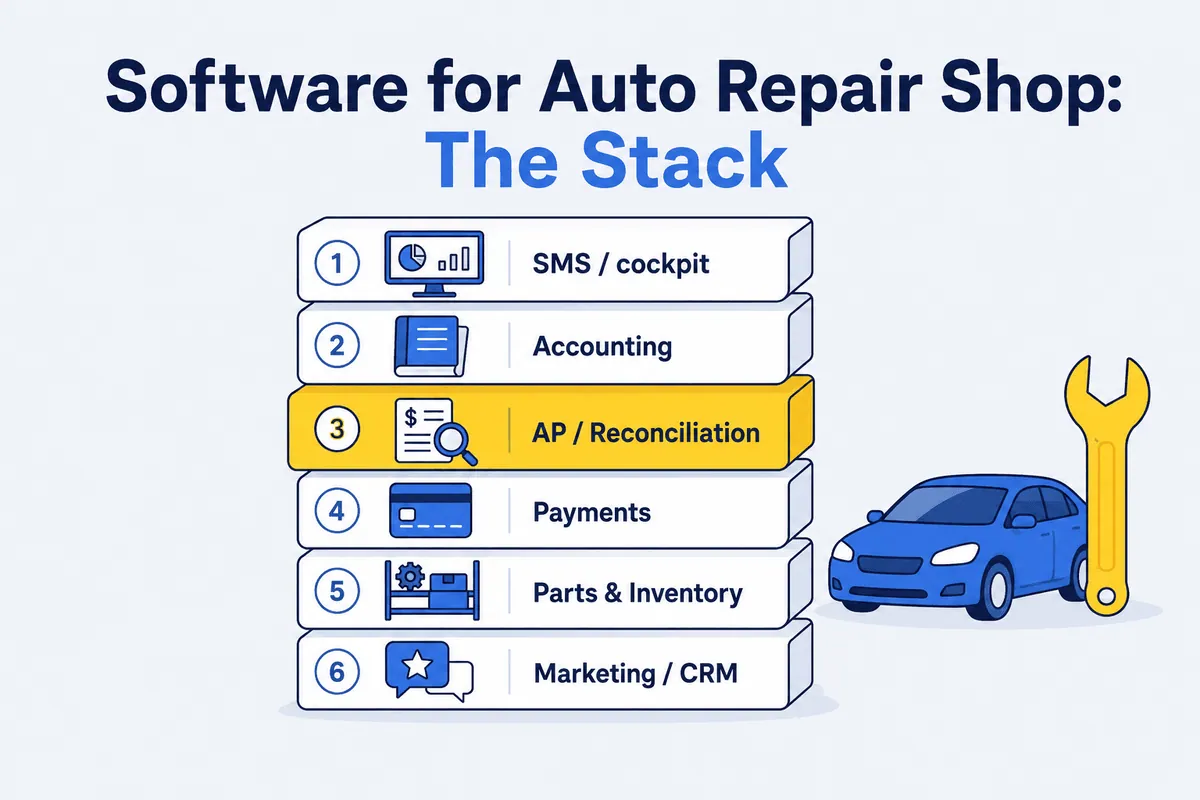

If you search “software for auto repair shop,” you get a wall of results that all promise the same thing: one app to run the whole shop. One app to rule them all. (I grew up sweeping my dad’s shop floor, and I can tell you the one-app dream has about the same shelf life as a loaner-car air freshener.) Software for an auto repair shop isn’t an app. It’s a stack - roughly six layers that each do one job, hand off to the next, and leave a seam where they meet. The seams are where your margin quietly leaks.
This is a map for the owner or multi-shop operator, not the consumer. It lays out the six layers a running shop actually leans on, what each one does, the real tools in each, and - more useful - the gap each layer leaves uncovered. Run one shop and you run all six. Run a group and you run six layers times N locations, and the seams multiply right along with you.
Know the layers and you stop buying overlapping tools that all miss the same thing.
What “software for auto repair shop” actually means (it’s a stack, not an app)
When an owner says “our software,” they almost always mean the shop management system - the screen the service writer lives in all day. That’s one layer. A working shop also keeps books, takes payments, tracks parts, and chases reviews and repeat customers. Each of those is a different category of automotive software, usually a different vendor, with its own login and its own data.
A “stack” is just the set of those layers and the way they connect. The SMS feeds sales into accounting. The payment processor feeds deposits into the bank feed. Vendor invoices flow from the parts house into accounts payable. Every arrow between two boxes is an integration - and every integration is a place where data gets dropped, duplicated, or trusted when it shouldn’t be.
For a multi-location operator, this isn’t theoretical. You’re running the same six layers across every shop, and you need them to roll up to a group view. The stack is the architecture of your back office. Most owners have never drawn it.
The six layers of an auto repair shop software stack
Here are the six layers, what each does, the tools that own it, and - the part nobody talks about - the seam each one leaves open.
1. Shop management system (SMS) - the cockpit
This is the layer most people mean when they say software for auto repair shop. The SMS is where the day happens: estimates, repair orders, scheduling, digital vehicle inspections, tech assignments, and the customer-facing side of the work. The names here aren’t interchangeable, so don’t shop them like they are:
- Tekmetric - cloud-native, built around digital vehicle inspections, real-time reporting, and a tech-facing mobile app, with a wide integration list to parts suppliers.
- Shop-Ware - leans hard into multi-location consistency: shared customer history, reporting, and employee management across stores.
- Mitchell 1 - its Manager SE management software ties in to the company’s own repair and estimating data (ProDemand), backed by the SureTrack “Real Fixes” community.
- Protractor - the back-office favorite, known for deep built-in accounting and reporting that group and franchise operators lean on.
- Fullbay - the heavy-duty specialist; truck and trailer shops and fleet maintenance, with MOTOR parts and labor data wired in.
- RO Writer - its Smart eCat lets a writer check parts price and availability across suppliers right inside the repair order screen before ordering.
- NAPA TRACS - backed by NAPA, with catalog parts ordering from NAPA and other vendor sources for shops built around that supply line.
This is your cockpit. The seam: the SMS trusts whatever cost and price get keyed into the RO. If your counter guy types $112 for a part the invoice actually billed at $138, the SMS reports a margin that never existed. It’s a system of record for what someone entered, not a check on whether what they entered is true. That’s not a knock on the SMS. It was never built to audit itself - that would be like asking the speedometer to also catch you speeding.
2. Accounting and bookkeeping - the ledger
Below the cockpit is the ledger: payroll, taxes, profit-and-loss, balance sheet, cash flow. For the overwhelming majority of shops this means QuickBooks (Online or Desktop), with Sage or Xero turning up at larger or more specialized operations. This is the accounting software for an auto repair shop your CPA actually opens, and getting the setup right matters - see our QuickBooks for auto repair shops best practices and the broader accounting and bookkeeping software guide.
The seam: accounting sees dollars, not parts. QuickBooks knows you paid your parts vendor $9,400 last month. It has no idea whether those parts turned into sales, sat on a shelf, or got returned for a credit that never posted. The ledger balances at the account level and stays blind at the part level.
3. Accounts-payable / parts reconciliation - the audit
This is the layer most shops don’t know is a layer - and it’s where WickedFile lives. It sits between the SMS, your vendor invoices, and QuickBooks and asks the one question the other layers can’t: is the money these systems are moving actually correct? It reads vendor invoices, matches them line by line against what the SMS shows and what posted to the books, and flags the gaps - uncredited cores, returns that never came back, parts billed but never sold, prices that don’t match the matrix.
Let me be precise about what this layer is not, because honesty is the whole point. WickedFile does not process payments. It doesn’t issue corporate cards. It doesn’t do accounts receivable or customer invoicing. It doesn’t manage inventory, run a CRM, write estimates, or book appointments. It does not replace your SMS, and it does not replace QuickBooks. It checks whether the numbers those layers move are right. That’s the job, and that’s the whole job. For the full picture of what this covers, read what parts reconciliation is and why it’s critical for your shop.
The seam this layer closes is the gap between the cockpit and the ledger - the one neither the SMS nor accounting can see across on its own.
4. Payments / merchant processing
Somebody has to take the customer’s card. The payments layer - an SMS-embedded processor or a standalone merchant account - authorizes, captures, settles, and deposits. It owns transaction fees, chargebacks, and the deposit feed that lands in your bank. In auto repair specifically, 360 Payments and 212 Payments are popular choices.
The seam: settlement timing and fee netting rarely line up cleanly with what the SMS recorded as collected, so deposits and recorded sales drift apart and someone has to reconcile them.
5. Parts and inventory
This layer covers ordering, receiving, stocking, and tracking parts - sometimes inside the SMS, sometimes in dedicated automotive parts inventory software, sometimes through the parts vendor’s own catalog and ordering tools. It’s also where cores and returns physically live: the core bin by the back door, the return pile waiting on Friday’s parts driver.
The seam: inventory software tracks what’s on the shelf, but the value of an unreturned core or an unposted return doesn’t show up as a missing part - it shows up as a credit you never got, which is a reconciliation problem, not a stock-count problem. That’s why core charges leak so much profit in auto shops even when the parts room looks spotless.
6. Marketing / CRM / reviews
The last layer is how you fill the bays: appointment reminders, review requests, email and text campaigns, and the customer database that ties it together. Popular choices here include Shopgenie (now Tekmetric Marketing) and AutoOps. The one thing worth knowing before you shop it: an auto repair CRM is almost always either a feature set inside your SMS or a bolt-on holding a copy of your customer list, and which one you’re buying is the whole decision. Otherwise it matters more for top-line growth than for the parts-margin story this piece is about - so I’ll keep it short. It’s a real layer, it deserves a budget line, and it has exactly nothing to do with whether your vendor credited last month’s cores.
One part of this layer is its own specialty: getting found in the first place. If the schedule has holes because customers can’t find you on Google or in AI search, that’s a job for local SEO for auto repair firms like Rank High AI, not a marketing feature bolted onto your SMS.
Where the layers don’t talk
Notice the pattern. The SMS sees what was entered. Accounting sees what was paid. Neither sees what should have happened in between. That unguarded seam is where parts margin walks out the door without anyone noticing.
It shows up a few predictable ways. A part priced off the matrix to close an easier sale, with the SMS recording the lower price as if it were policy - the parts matrix is only as good as the adherence to it. A service advisor discount that hands margin away to land the ticket. A core that never goes back on the truck, or goes back and never gets credited. A part bought for a job that never shows up as a sale or a return - accounting sees the spend, the SMS sees no matching sale, and nobody connects the two.
Different symptoms, same disease. Each one falls in the gap between the cockpit and the ledger. The two layers each see half the picture. The half they don’t share is where the money goes.
A worked example - what the seam costs a 3-shop group
Numbers make this real. Take a three-shop group - the kind of operator we built for. The following is illustrative, not a quote from your books, but the inputs are conservative.
Say each shop does about 60 core-eligible jobs a month. A fair share of cores walk - call the walkaway rate 20%, meaning one in five never gets back or never gets credited. Put the average core at $75.
Per shop, the math:
- 60 jobs x 20% walkaway = 12 lost cores a month
- 12 cores x $75 = $900 per shop, per month
Now across the group:
- $900 x 3 shops = ~$2,700 a month
- $2,700 x 12 = ~$32,400 a year
And that’s cores alone - one symptom. Stack off-matrix pricing, advisor discounting, and parts-bought-never-sold on top and the number climbs. For context, net margins in this trade run in the single digits, and industry outlets like Ratchet & Wrench track just how thin shop financials really are. Recovering $32,400 of parts margin is a meaningful slice of a number that thin.
Here’s the part that matters for a stack discussion: no single layer catches this. The SMS shows the core charge was added to the RO and considers its job done. Accounting shows the parts invoice was paid and considers its job done. The inventory system shows the bin. None of them reconciles the core charged against the credit received - so the loss sits between the boxes, on no one’s screen, until a reconciliation layer puts the two records side by side.
How to choose software for auto repair shop layers without overlap
You don’t buy six tools on day one, and you don’t want six tools that all do the same thing. Sequence it:
- SMS first. It’s the cockpit; nothing else functions without it. Pick the one your service writers will actually use all day. (We’ve written a full how to choose the best automotive repair software guide and a head-to-head software comparison for this step - this piece is the map, those are the decision trees.)
- Sync accounting. Get the SMS-to-QuickBooks connection clean before you add anything else, so your books and your sales agree.
- Add reconciliation once parts volume is real. When cores, returns, and matrix drift add up to real dollars, layer in AP/parts reconciliation.
Here’s my one strong opinion, and it’s the warning that costs operators the most: an “all-in-one” SMS does not cover the reconciliation layer, no matter what the demo says. It’ll advertise accounting integrations, payments, even inventory - and it still trusts whatever was keyed in, because it’s a cockpit, not an audit. A plane with every gauge on the panel still can’t tell you the fuel truck shorted you. The same caution applies if a vendor pitches a single do-everything suite; before you sign, read whether an auto repair shop actually needs an ERP rather than six focused layers. Generic AP and bill-pay tools don’t close the gap either - they move money, they don’t check it against your ROs and your matrix. We get into why generic AP tools fail shops if you want the detail. For a group standardizing across locations, the same logic scales - see building a multi-location auto repair back office. And if you’re weighing where reconciliation sits next to the bill-pay platforms, that’s what /compare is for.
Bottom line - your next move
Software for an auto repair shop isn’t one app. It’s six layers: the SMS cockpit, the accounting ledger, the AP/parts-reconciliation audit, payments, parts and inventory, and marketing. Each does one job well and leaves a seam at its edge. The parts-margin leaks all live in those seams - and the most expensive seam, the one between the SMS and the books, is the one nothing in a default stack is watching.
That seam is the only layer WickedFile plays. We don’t run your shop, take your payments, or keep your books. We check whether the money the rest of your stack moves is correct, and we tell you where it isn’t.
If parts volume is real and you’ve never had that layer, see what it surfaces before your core bin starts charging rent. Book a demo.