
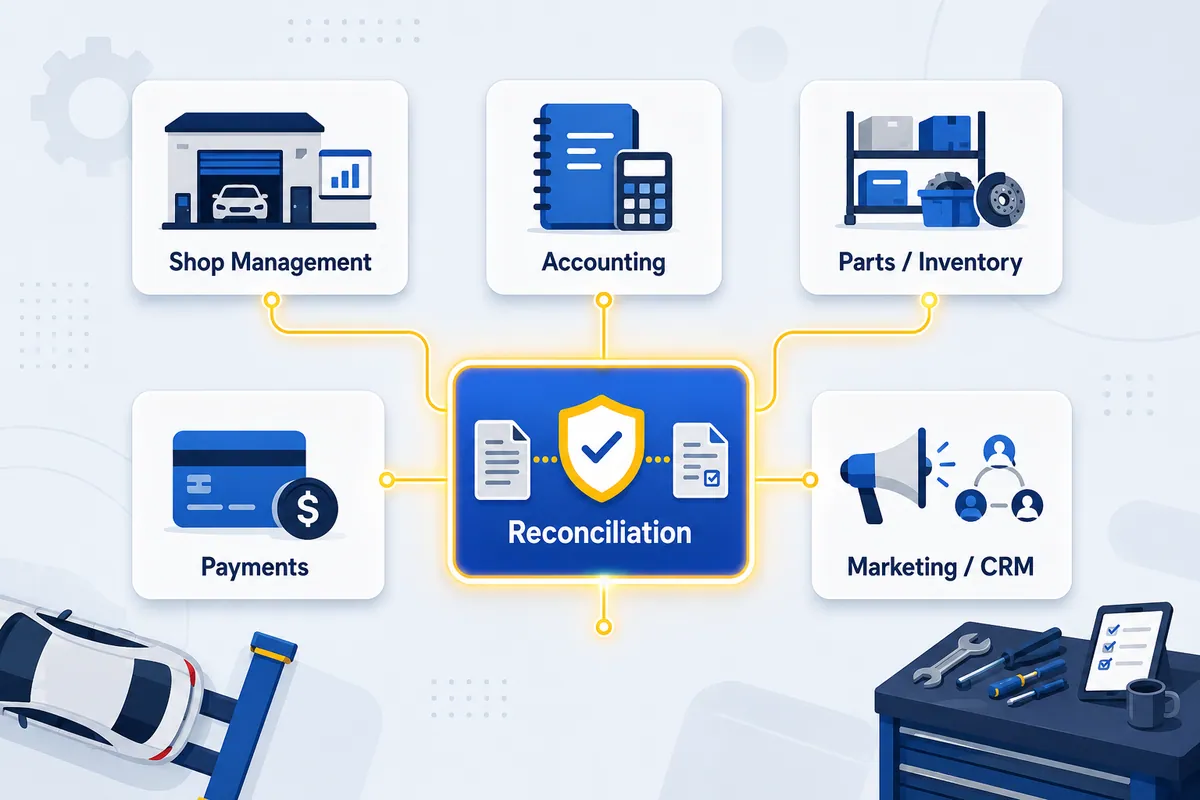

If you run a repair shop, “automotive software” might be the worst search you’ll make all week. Type it in and Google hands you factory robotics, dealership CRMs, and fleet telematics, almost none of which has anything to do with the building you unlocked this morning. It’s like asking the parts counter for “a part” and waiting to see what they bring out. This guide narrows it down.
I grew up in my dad’s shops, and I’ve since walked the back office of hundreds more. The tools change. The confusion about which tool does what does not. So this is a map, not a buyer’s list. It sorts the automotive software a repair shop actually touches into six clear categories, names the real tools in each, and points at the one job every single one of them skips.
Written for the owner and the multi-shop operator. Not the customer in the waiting room. When you’re ready to actually rank and pick tools, the deep dives are linked as we go.
”Automotive Software” Means Three Different Industries
The phrase is broad because the industry is broad. Three different worlds claim it:
- Manufacturing. The people who build the car run PLM (product lifecycle management), MES (manufacturing execution systems), and heavy supply-chain platforms. Factory-floor software. It has nothing to do with fixing cars.
- Dealerships. New- and used-car dealers run a DMS (dealer management system) plus F&I tools, inventory merchandising, and showroom CRMs. Some of it grazes the service drive, but it’s built around selling vehicles, not repairing them.
- Repair shops. Independent shops, franchises, and multi-location groups run a tighter stack: tools to write the repair order, order parts, keep the books, take payment, and bring customers back.
When a shop owner searches automotive software, they mean that third world. The rest of this guide lives there. (If you were hoping for the robots, I’m sorry. Different blog.)
The 6 Categories of Automotive Software a Repair Shop Touches
Almost every tool in your shop drops into one of six buckets. Here’s the take most owners don’t want to hear: there is no single all-in-one platform that runs all six well, and the ones that claim to are selling you the brochure, not the build. Your shop management system covers the first category beautifully and merely touches the other five. It’s a great quarterback. It is not the whole team.
Here is the full map in one table.
| Category | What it does | Real tools | What it does NOT do |
|---|---|---|---|
| Shop management system (SMS) | Estimates, repair orders, scheduling, parts ordering, the matrix, customer messaging | Tekmetric, Shop-Ware, Mitchell 1, NAPA TRACS, Protractor, RO Writer | Audit vendor invoices line by line; run your general ledger |
| Accounting software | General ledger, P&L, balance sheet, payroll, accounts payable | QuickBooks (most shops), Sage, Xero | Know what happened at the parts counter or on the RO |
| Parts & inventory | Track parts on hand, cores, ordering, counts | PartsTech, MyPlace4Parts, SMS-native inventory | Confirm the vendor billed you the price you agreed to |
| Payments | Take customer payment, process cards | Integrated SMS processors, standalone terminals | Tell you whether the underlying job was priced right |
| Marketing & CRM | Reviews, reminders, retention, campaigns | Shopgenie, Kukui, Steer, AutoVitals | Touch the money or the parts ledger at all |
| AP / invoice reconciliation | Audit vendor invoices vs. the RO and the ledger; catch leaks | WickedFile | Replace any of the above; it sits between them |
Walk the operational categories below. Then we’ll get to the row the table keeps flagging in bold.
Your SMS Runs the Shop. It Does Not Audit the Bill.
The SMS is the heart of the shop. It’s where the service advisor builds the estimate, where the repair order lives, where the matrix marks up parts, and where the tech clocks the job. Names you already know: Tekmetric, Shop-Ware, Mitchell 1, NAPA TRACS, Protractor, RO Writer.
Ratchet & Wrench puts the picking problem plainly in its guide to choosing shop management software: there’s no one-size-fits-all system, and swapping one mid-stream “can cripple a business.” So choose like you mean it. If you want a ranked breakdown of the leading platforms, I keep that separate from this map. See the roundup of the best auto repair software tools and the criteria piece on how to choose shop software.
What an SMS is great at: running the front of the shop. What it was never built to do: independently audit the vendor invoice that shows up two weeks after the part went in the car. It records the order. It does not check the bill. Those are different jobs, and assuming one tool does both is how the trouble starts.
Automotive Accounting Software Records the Money. It Doesn’t Verify It.
Your accounting software, almost always QuickBooks, is the system of record for cash. General ledger, P&L, balance sheet, payroll, accounts payable. It tells you what you paid and what you made.
Here’s the part it can’t do: tell you whether what you paid was correct. QuickBooks sees a $4,200 monthly invoice from your parts vendor and dutifully records it. It does not know that $180 of it was a core you already returned, or that three line items were priced above the matrix you agreed to. Accounting software doesn’t verify reality. It records what gets entered, and it trusts the invoice the way a labrador trusts a stranger holding a sandwich.
I watched this play out at a transmission franchise. They started reconciling vendor statements and found, almost immediately, that an employee at one of their vendors had been withholding credits to pad his own department’s numbers. Thousands of dollars that should have come back never did. The owner was furious, mostly because he had “Stop the Steal” signs hanging all over his own shop. He’d been watching the wrong door. The lesson wasn’t that vendors are crooks. It was that every dollar deserves verification, no matter which side of the counter it comes from.
I cover that blind spot in depth in the piece on automotive accounting software.
Parts and Inventory Software Tracks the Part, Not the Price You Paid
Parts are where the margin is, and where it disappears. Inventory and parts software tracks what’s on hand, what’s on order, and what’s gathering dust in the core bin. Some shops use SMS-native inventory; others bolt on tools like PartsTech for sourcing and pricing.
But every inventory tool has the same ceiling: it tracks the part, not the bill for the part. It’ll happily tell you a starter is on the shelf. It can’t tell you the vendor charged you list when you’d negotiated jobber, or that a return slip never turned into an actual credit. A return slip is a promise. A credit memo is the money. Those are not the same thing, and one of them pays the rent.
Payments and Marketing: Useful, and Completely Blind to the Vendor Bill
Two quick categories so the map is honest.
Payments software takes the customer’s money and processes the card. It’s essential, and it knows exactly nothing about whether the job behind that payment was priced right. It collects the number. It doesn’t grade it.
Marketing and CRM tools (Shopgenie, Kukui, Steer, AutoVitals) drive reviews, reminders, and retention. They fill the bays. Worth knowing that most of them don’t own your customer record, they hold a copy synced out of your SMS, and what an auto repair CRM stores walks through why that distinction decides which one you should buy. They also don’t touch the parts ledger or the vendor invoice in any way, which is fine, because that was never their job. Nobody asks the marketing software where the core credit went. (Well, nobody who’s met the marketing software.)
The Job Every Category Skips: Reconciling the Vendor Invoice
Read back through the six. The SMS knows what was ordered. Accounting knows what was paid. Inventory knows what’s on hand. Payments knows what was collected. Marketing knows what’s coming in the door.
Not one of them independently audits the vendor invoice, line by line, against the repair order and the ledger. That’s the gap. It’s not dramatic, which is exactly why it survives. It’s where missed credits, uncredited cores, off-matrix pricing, and parts bought but never sold quietly slip out month after month. None of it is big enough to notice on its own. All of it together is.
Here’s the math, and I’m labeling it illustrative on purpose. Say a 3-location group runs $45,000 a month in parts purchases per store, $135,000 across the group. Assume just a 1.5% leak on vendor invoices nobody audits line by line. That’s conservative; plenty of shops run higher before they look. That’s $2,025 a month, or $24,300 a year, walking out the door of a three-shop group.
Now put it in shop terms. On the single-digit net margins independent repair lives on, recovering that lost profit by selling more work is brutal. At a 5% net margin, you’d have to ring up roughly $486,000 in extra sales just to net the same $24,300 back. The leak is far cheaper to close than to out-sell. (We’re gonna need a bigger boat, and the bigger boat is a calculator.)
This is the one category WickedFile occupies. It’s the AP and parts-invoice reconciliation layer that sits between your SMS, your vendor invoices, QuickBooks, and your bank feed, and surfaces what each alone can’t: missed credits, billing errors, uncredited cores, matrix non-adherence, and parts that were bought but never sold.
Now the honest part. WickedFile is not an SMS, not an ERP, not accounting software, and not an inventory system. It does not process payments, issue cards, or run your AR and invoicing. It does not replace QuickBooks or your shop management system, and it would make a terrible quarterback. It’s the audit layer between the tools you already run. I go deeper in invoice reconciliation software.
How to Assemble a Stack Without the Overlap
You don’t need one app for everything. You need one strong tool per category and clean handoffs between them. A practical order:
- Start with the SMS. It’s the hub; everything else integrates to it. Pick deliberately, because switching later is the kind of pain you only sign up for once.
- Wire in QuickBooks. Make the SMS-to-accounting sync clean so nobody’s double-entering at 6 p.m.
- Add payments and parts/inventory as volume grows, ideally the ones your SMS already integrates with, so you’re not duct-taping systems together.
- Layer marketing/CRM when retention becomes the bottleneck.
- Add reconciliation once parts volume is real. It’s the category most owners skip, and the one that pays for the other four, because it protects the margin they generate.
For the full layer-by-layer build, see the auto repair software stack.
The whole point of the map: automotive software isn’t one purchase, it’s six jobs. Get one good tool for each, make them talk to each other, and don’t let the gap between them become the place your profit goes to retire early.
Try WickedFile free → — 500 scanned pages, no credit card. Or compare the options.